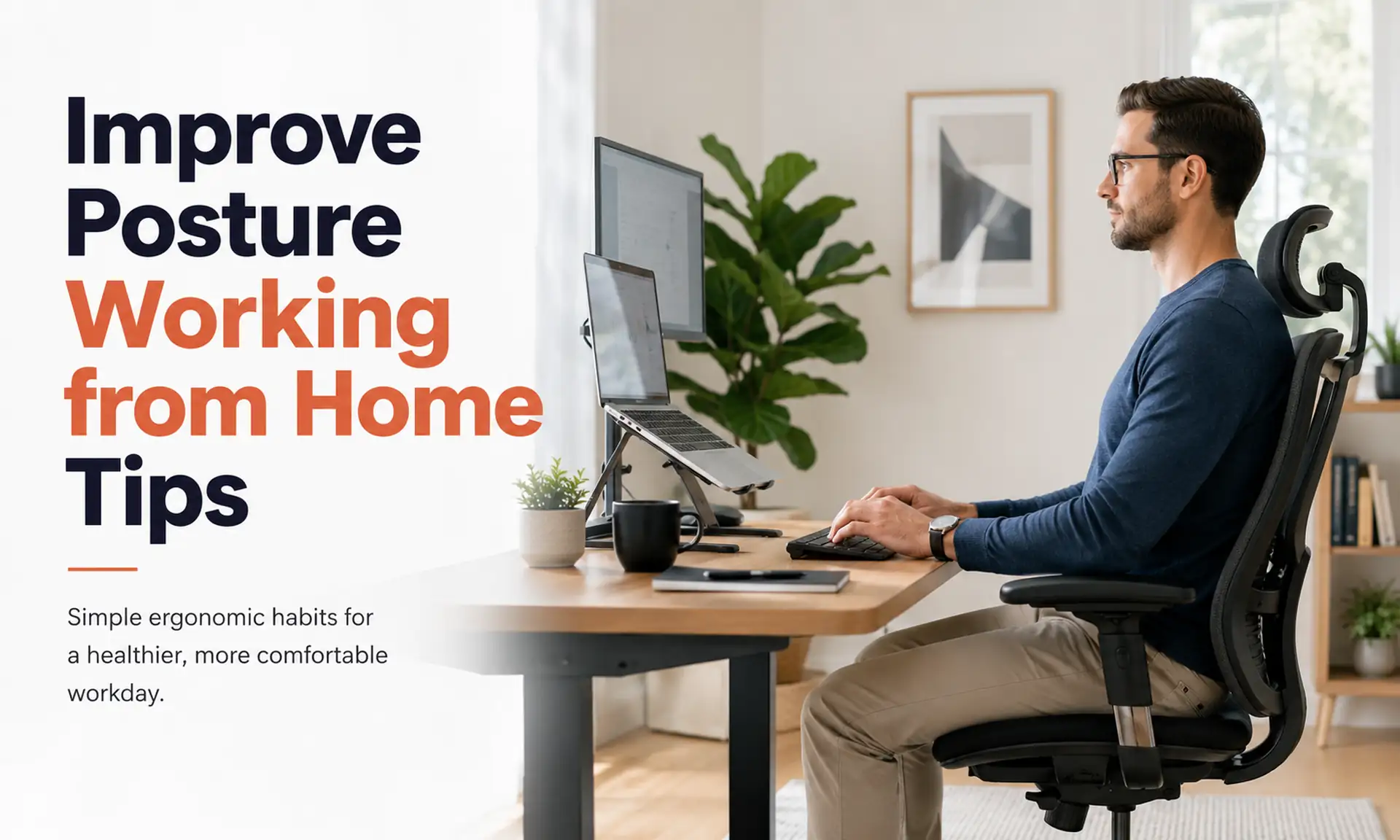
Improve Posture Working from Home Tips start with a simple idea: set up your chair, screen, keyboard, and feet so your body feels supported, then change your position often. Keep your screen near eye level, relax your shoulders, support your lower back, and take regular movement breaks. This guide shows you how to do each step at home.
Working from home can feel comfortable at first. But hours on a couch, bed, dining chair, or low laptop can leave your neck, shoulders, and back feeling sore.
The good news? You do not need a perfect office or costly gear. A few small changes can make your work space much easier on your body.
What Does Good Work From Home Posture Look Like?
Good posture does not mean sitting stiff and straight all day. It means keeping your body in a comfortable position where your joints do not have to work harder than needed.
Health experts often call this a neutral position. In simple words, your body stays in a natural and relaxed shape. Your head stays over your shoulders, your shoulders stay relaxed, and your back keeps its normal curves.
A good starting position looks like this:
- Keep your head level and face forward.
- Relax your shoulders instead of lifting them.
- Keep your elbows close to your body.
- Keep your wrists straight when you type.
- Support your lower back.
- Keep your hips around the same height as, or a little higher than, your knees.
- Place both feet on the floor or on a footrest.
- Put your screen in front of you.
- Keep your keyboard and mouse close enough that you do not have to reach.
OSHA also notes that there is no single perfect position that fits every person. Your work area should fit your body and let you change positions during the day.
Quick Posture Checklist for Working From Home
Want a fast check before you start work?
Use this simple table.
| Body area | What to check |
|---|---|
| Head | Keep it upright, not pushed far forward |
| Shoulders | Keep them relaxed |
| Back | Let the chair support your lower back |
| Elbows | Keep them close to your sides |
| Wrists | Keep them straight while typing |
| Hips | Keep them level with or slightly above your knees |
| Feet | Rest them flat on the floor or a footrest |
| Screen | Place it in front of you at a comfortable height |
| Keyboard | Keep it close enough to avoid reaching |
| Mouse | Keep it beside the keyboard |
These Improve Posture Working from Home Tips work best when you check your setup more than once. Your body can slowly slide into a poor position without you noticing.
1. Start With Your Chair
Your chair supports much of your body during computer work, so start here.
Sit back in the chair instead of sitting on the front edge for long periods. Let the backrest support your back. Your lower back should feel supported rather than rounded.
OSHA recommends a chair that supports the natural curve of your spine. It also suggests using a rolled towel or separate back cushion if your chair does not provide enough lower back support.
No office chair?
That is okay.
Try these simple fixes:
- Roll a small towel and place it behind your lower back.
- Add a firm cushion if your chair feels too deep.
- Use a stable dining chair instead of a very soft couch.
- Avoid a chair that makes your feet hang in the air.
- Choose a seat that lets you get close to your table or desk.
A simple chair that fits you well can feel better than an expensive chair that does not.
2. Keep Your Feet Supported
Your feet help give your body a stable base.
Place both feet flat on the floor when possible. If they do not reach the floor, use a footrest. A firm box can also work as a short term fix.
Do not raise your chair only to match a high table and then leave your feet hanging. Unsupported feet can make it harder to sit comfortably.
OSHA recommends full support from the floor or a footrest.
3. Check Your Knee and Hip Position
You do not need to force your knees into an exact angle all day.
A comfortable starting point is to keep your thighs supported and your hips around the same height as, or slightly above, your knees. OSHA advises keeping the thighs roughly level with the floor or the hips a little higher than the knees.
Avoid tucking your feet far under your chair for hours. Also avoid sitting with one leg crossed all day.
Want a simple rule? Your legs should feel supported, relaxed, and free to move.
4. Raise Your Screen to a Comfortable Height
A low screen often makes you drop your head and lean forward.
Place your monitor in front of you so you can look at it without keeping your neck bent up or down. OSHA warns that a monitor that sits too high can make you tilt your head back and tire your neck and shoulder muscles.
For many people, placing the upper part of the screen around eye level gives a useful starting point. Adjust it if that position does not feel comfortable for your body or your glasses.
Using a laptop?
A laptop creates a common problem. If the keyboard sits at a good typing height, the screen may sit too low. If you raise the screen, the keyboard may become too high.
A simple solution is to:
- Raise the laptop on a stable stand or stack of strong books.
- Use a separate keyboard.
- Use a separate mouse.
- Bring both close to your body.
HSS experts also recommend a separate keyboard and mouse when raising a laptop screen to help reduce hunching.
This is one of the most useful Improve Posture Working from Home Tips for people who spend most of the day on a laptop.
5. Keep Your Keyboard and Mouse Close
Your arms should not have to chase your keyboard and mouse across the desk.
Move them close enough that your elbows can stay near your sides. Keep your wrists straight instead of bending them far up, down, or sideways.
OSHA recommends placing the keyboard and mouse close together and at about the same height. This helps reduce reaching.
Ask yourself:
Can I use my mouse without lifting my shoulder or stretching my arm?
If the answer is no, bring it closer.
6. Relax Your Shoulders
Shoulder tension often builds slowly while you type.
Check your shoulders several times during the day. If they feel raised toward your ears, relax them and bring your arms closer to your body.
Your desk may sit too high if you have to lift your shoulders to reach the keyboard. Your chair may also sit too low.
Do not try to pull your shoulders hard backward all day. Aim for a relaxed position instead.
7. Support Your Lower Back
Your spine has natural curves, including one in your lower back. Good posture supports those natural curves instead of forcing your back completely flat.
You can improve support by:
- Sitting against the chair back.
- Using a small rolled towel behind your lower back.
- Adjusting the chair back if possible.
- Keeping your feet supported.
- Avoiding long periods of slumped sitting.
These simple Improve Posture Working from Home Tips can help if your lower back feels tired before the end of the workday.
8. Do Not Stay in One Position All Day
Even a good sitting position can become uncomfortable if you hold it for too long.
HSS recommends getting up and moving about every 30 to 40 minutes. It also advises against sitting in one position for more than an hour.
You do not need a long workout each time.
Try to:
- Stand while taking a phone call.
- Walk to another room.
- Refill your water.
- Stretch for a minute or two.
- Change from sitting to standing.
- Walk around the house.
- Reset your sitting position when you return.
Think of good posture as movement plus support, not one fixed pose.
9. Try a Simple Posture Reset
Feeling stiff?
Use this short reset during a break.
Chin tuck
Sit or stand tall. Look straight ahead. Gently draw your chin backward without tipping your head down.
Hold briefly, then relax.
Shoulder blade squeeze
Relax your shoulders. Gently bring your shoulder blades toward each other.
Do not lift your shoulders.
Chest stretch
Stand in a doorway. Place your forearms gently against the sides of the doorway and step forward until you feel a light stretch across your chest.
Do not force the stretch.
Stand and walk
Stand up and walk for a few minutes. This simple step changes the load on your body after sitting.
HSS recommends regular stretching and movement to loosen tense muscles and reset posture.
Stop any movement that causes sharp pain, numbness, or new weakness.
10. Avoid Working From the Couch for Long Hours
The couch feels comfortable, but it often makes good computer posture harder.
Soft seats can let your hips sink down. You may round your back, push your head forward, and place the laptop low on your lap.
If you must use a couch for a short time:
- Support your lower back with a firm cushion.
- Raise your laptop instead of looking down at it.
- Use a separate keyboard if you raise the screen.
- Support your feet.
- Change position often.
- Move back to a firmer work area when you can.
HSS notes that people can improve many home work areas, including couches, beds, tables, counters, and desks, but regular movement still matters.
11. Avoid Working From Bed When Possible
Working from bed can make you bend your neck and round your back for long periods.
It may also become harder to place your screen, arms, and legs in a useful position.
If bed is your only choice for a short time:
- Sit against firm support.
- Add pillows behind your back.
- Keep the screen higher.
- Avoid bending your neck toward your lap.
- Take more movement breaks.
Still, a firm chair and stable table will usually give you more control over your setup.
12. Try Sitting and Standing
Do you have a standing desk or a high counter?
Standing can give you a useful change from sitting, but standing all day is not the goal either. Change positions instead.
When you stand:
- Keep your screen in front of you.
- Keep your shoulders relaxed.
- Keep your keyboard close.
- Keep your wrists straight.
- Stand with your weight spread across both feet.
- Avoid locking your knees.
- Move often.
A sit and stand routine can help you avoid staying in one fixed position for hours.
13. Watch for Glare and Poor Lighting
Your screen is not the only thing that can affect your posture.
If you cannot see the screen clearly, you may lean forward, twist your body, or lift your chin without noticing.
OSHA says glare and poor lighting can lead to eye strain and may cause people to use awkward positions to see the screen.
Try these fixes:
- Move the screen away from strong window glare.
- Adjust the room light.
- Clean your screen.
- Increase text size when needed.
- Place the screen where you can read without leaning forward.
14. Keep Things You Use Within Easy Reach
Do you often stretch across the desk for your phone, notebook, or drink?
Move common items closer.
HSS recommends keeping work items within arm’s reach so you do not strain every time you need them.
Keep these nearby:
- Mouse
- Keyboard
- Phone
- Water
- Notebook
- Pen
- Headset
Small reaches may not feel like much, but you can repeat them hundreds of times during a workweek.
15. Use a Headset for Long Calls
Avoid trapping your phone between your shoulder and ear.
That position bends your neck to one side and raises your shoulder.
Use headphones, a headset, or speaker mode for longer calls when possible. HSS also advises against holding a phone between the shoulder and ear.
Common Work From Home Posture Problems and Quick Fixes
| What you notice | What to check |
|---|---|
| Neck feels tired | Screen may sit too low or too high |
| Shoulders feel tight | Keyboard or mouse may sit too far away |
| Lower back feels sore | Add back support and change position |
| Feet hang off the floor | Lower the chair or add a footrest |
| Wrists bend while typing | Change keyboard height or position |
| You lean toward the screen | Raise screen height or increase text size |
| Hips feel stiff | Stand, walk, and change position more often |
| One shoulder feels tired | Bring your mouse closer |
| You slump after a while | Reset your posture and take a movement break |
This table can help you find the cause before buying new equipment.
Do You Need the 90 Degree Rule?
You may hear that your knees, hips, and elbows must all stay at exactly 90 degrees.
That rule can work as a simple starting point, but your body does not need to stay at one exact angle. OSHA says elbows can stay close to the body while bending between about 90 and 120 degrees.
Comfort, support, and easy movement matter more than forcing every joint into a perfect number.
Can You Improve Posture Without Buying Anything?
Yes. Many useful changes cost little or nothing.
Try this first:
- Raise your laptop with strong books.
- Roll a towel for lower back support.
- Use a firm box as a footrest.
- Move your keyboard and mouse closer.
- Increase text size instead of leaning toward the screen.
- Take regular standing and walking breaks.
- Use speaker mode for calls.
- Change your work position during the day.
These Improve Posture Working from Home Tips focus on fitting your work area to your body before spending money.
How Often Should You Take a Posture Break?
There is no single break schedule that fits everyone.
A useful approach is to avoid staying still for long periods. HSS suggests moving every 30 to 40 minutes and not remaining in one position for more than an hour.
A posture break can last only a few minutes. Stand, walk, stretch gently, or change your work position.
The key is doing it often enough that stiffness does not build all day.
When Should You Get Medical Help?
Many work related aches improve after you change your setup and move more. Still, do not assume every pain comes from posture.
Talk with a health professional if pain keeps getting worse, lasts for a long time, or stops you from doing normal tasks.
Seek medical advice sooner if you have symptoms such as:
- New numbness or tingling
- New weakness
- Severe pain
- Pain after a serious fall or injury
- Symptoms that spread into an arm or leg
- Trouble using your hand normally
These signs need more than a chair or desk adjustment.
Frequently Asked Questions
What is the best posture for working from home?
The best starting position keeps your head level, shoulders relaxed, back supported, wrists straight, feet supported, and work tools close. You should also change position often instead of trying to hold one pose all day.
How can I stop slouching while working from home?
Set your screen in front of you, support your lower back, keep your feet stable, and bring your keyboard closer. Then set simple reminders to stand and reset your position during the day.
Is a standing desk better for posture?
A standing desk can help you change positions, but standing all day is not automatically better. Switch between sitting, standing, and moving when possible.
How can I improve laptop posture?
Raise the laptop screen and use a separate keyboard and mouse when possible. This lets you place the screen higher without forcing your arms into an awkward typing position.
Can poor posture cause neck and back pain?
An awkward work position can place extra strain on muscles and other body tissues. Poor screen, chair, keyboard, and mouse placement may add to neck, shoulder, wrist, and back discomfort.
How long does it take to improve posture?
There is no fixed number of days. Your setup can feel better right away after a useful change, but building better work habits takes regular practice. Focus on small changes you can repeat every day.
Final Thoughts
The best Improve Posture Working from Home Tips are simple. Support your back and feet, place your screen well, keep your keyboard and mouse close, relax your shoulders, and move often.
You do not need to sit perfectly all day. Build a work space that fits your body, notice when you feel stiff, and change positions before discomfort builds.
For more simple ideas that make everyday home life feel comfortable and practical, keep exploring Turquoise Moon Homes.
