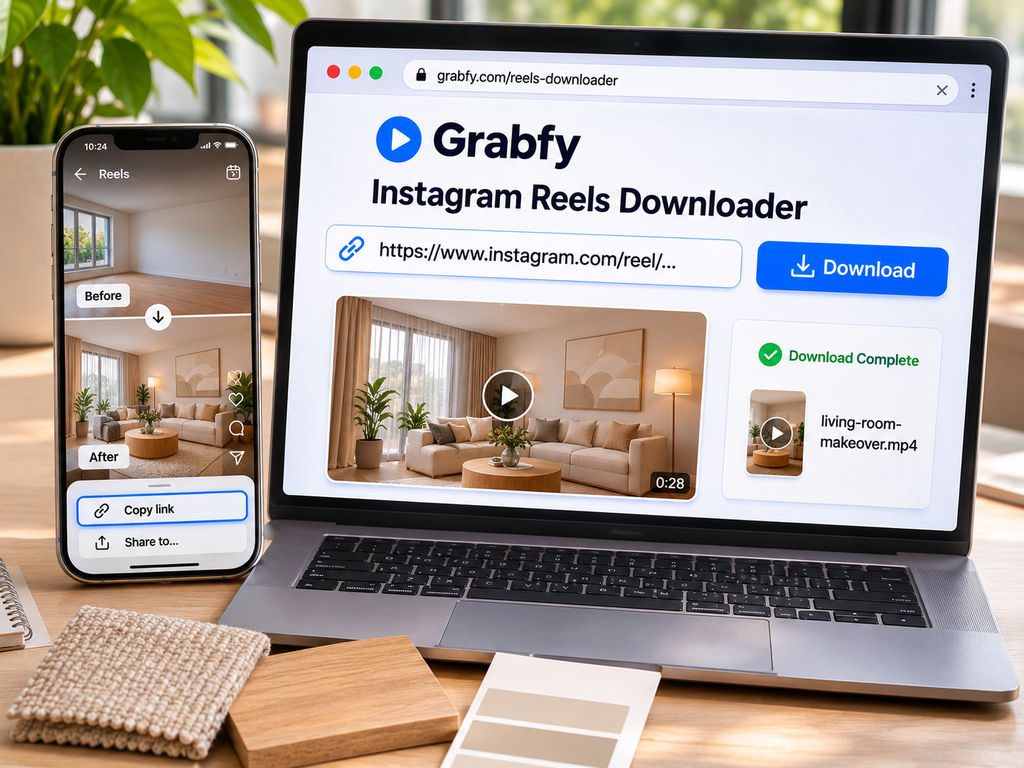
Instagram is full of home design ideas, from small-space storage solutions and kitchen makeovers to lighting tutorials and room transformations. Saving useful videos can help you revisit details when planning renovations, creating mood boards, or discussing ideas with a designer.
A browser-based downloader makes it possible to keep supported public Instagram media on your device without installing unfamiliar apps or sharing your Instagram password. This guide explains how to download videos with Grabfy, organize your home design references, and understand quality, privacy, and copyright limitations.
Quick Answer: Download Instagram Videos in 3 Steps
You can save supported public Instagram videos using a simple link-based process:
- Find the video. Open Instagram on your phone or computer and locate a public Reel or video post featuring an interior design idea.
- Copy the link. Tap Share or the three-dot menu and select Copy link. On the desktop, you may copy the post URL from your browser.
- Paste and download. Open a compatible downloader, paste the URL, and select the available file.
The resulting video can be stored locally for offline reference. Unlike Instagram’s Save feature, which bookmarks content inside your account, downloading creates a separate file.
Instagram also supports native downloads for eligible public Reels, but creators can disable this feature. Watermarks and audio restrictions may apply.
A person holding a smartphone displaying a colorful social media video feed in a bright room.
Why Grabfy Works for Home Design Inspiration
For homeowners, decorators, and interior design enthusiasts who want a straightforward way to download Instagram videos, Grabfy offers a browser-based solution for supported public posts. Its link-based workflow lets you collect permitted room tours, DIY demonstrations, and styling references without installing a separate downloader application.
The Grabfy Instagram Reels Downloader is particularly useful for short room transformations, furniture arrangement ideas, and renovation tutorials. Saved videos may be available in MP4 format, depending on the source.
Grabfy also provides tools for supported public Stories, photos, and carousel posts. These formats can complement videos when you want to compare color palettes, furniture details, or different stages of a room makeover.
How to Download Instagram Videos on Any Device
The steps are similar across devices, but saved-file locations differ.
Android
- Open a public Instagram video and copy its link.
- Launch Chrome or another mobile browser.
- Open Grabfy’s video downloader and paste the URL.
- Select the available download option.
- Find the file in Downloads or your device’s file manager.
Depending on your settings, downloaded videos may also appear in Gallery or Photos.
iPhone or iPad
- Copy the public Reel or video URL from Instagram.
- Open Safari and navigate to Grabfy.
- Paste the link and select Download.
- Check the Files app, usually under Downloads.
If needed, open a compatible video in Files and use the sharing options to save it to Photos.
Windows or Mac
Open Instagram in a desktop browser, copy the public video’s URL, and paste it into Grabfy in another tab. Download the available file and check your browser’s configured Downloads folder.
Desktop storage is convenient when comparing design references on a larger screen or preparing a renovation presentation.
Build a Home Design Inspiration Library
A collection becomes more useful when you can find ideas by room, style, or project rather than scrolling through unrelated files.
Organize Videos by Room and Project
Create folders for kitchens, bathrooms, living rooms, bedrooms, outdoor spaces, and DIY projects. Within each folder, group references by themes such as lighting, storage, color, furniture layout, or materials.
For example, a kitchen folder might contain cabinet refinishing tutorials, backsplash ideas, and countertop comparisons. Descriptive filenames make individual clips easier to recognize.
Add Photos and Carousel References
Videos show movement and process, but still images help you examine textures and finishes. For public photo posts, copy the URL and use a compatible photo downloader.
For multi-slide design guides, the Instagram Carousel Downloader can retrieve available slides from supported public carousel posts. This is helpful for before-and-after sequences, product galleries, and step-by-step decorating tips.
Keep the original Instagram link and creator’s username with each saved reference so you can revisit the source or request permission later.
Use Grabfy for Different Design References
When your inspiration library includes both videos and still images, Grabfy provides a practical starting point through its dedicated public-content downloading tools. Choose the format-specific option, save supported files, and place them in the appropriate project folder.
This workflow is especially useful when building a mood board for a single room or comparing several design directions before making purchases.
Downloading Stories, Highlights, and Other Content
Public Instagram Stories usually disappear after 24 hours unless added to Highlights. Saving an accessible Story can preserve a temporary design tip or event announcement when you have permission to keep it.
Highlights remain visible until their owner removes them. Availability still depends on whether the media is public and retrievable.
For carousel posts, save relevant individual slides rather than relying on screenshots that include Instagram’s interface. Avoid assuming every format or post will be available through a downloader.
Video Quality, HD Downloads, and Watermarks
Instagram processes uploaded videos for playback, so a downloadable version may differ from the creator’s original recording.
Quality depends on the initial upload, Instagram compression, available resolution, encoding, and audio licensing. Some videos may be available in HD, including 1080p, but no downloader can restore details already lost through compression or guarantee 4K quality.
Grabfy is designed not to add its own watermark to supported downloads. Existing logos, embedded branding, or attribution in the source may remain. Instagram’s native Reel downloads may also include platform branding.
For design research, check that fine details such as fabric textures, tile patterns, and paint finishes remain clear enough to evaluate. A compressed video should not be treated as a reliable color sample.
Safety, Privacy, and Copyright
Grabfy is intended for publicly accessible content, not private Instagram posts or Close Friends Stories. Public downloaders cannot bypass account privacy restrictions.
Avoid sites asking for Instagram passwords, authentication codes, unfamiliar extensions, or unnecessary permissions. If you need your own uploads, Instagram’s account information download option may help you obtain a broader archive.
Downloading a public design video does not grant permission to repost it, use it in advertising, or distribute it commercially. Credit alone does not replace authorization. Keep creator details and any permission records alongside professional project files.
A laptop displaying a browser-based Instagram video downloading interface on a clean desk beside a coffee cup.
Frequently Asked Questions
Can I Download Instagram Videos Without an Account?
Compatible browser-based tools may save supported public videos without Instagram login credentials. Private or restricted media remain unavailable.
Why Won’t an Instagram Video Download?
The post may be deleted, private, temporarily unavailable, or linked incorrectly. Check that the content is public and copy its URL again.
Can I Download Reels With Audio?
Some downloads include audio, but licensed music or source limitations may prevent the original soundtrack from being included.
Where Are My Saved Videos?
Check Downloads on Windows, Mac, and Android. On iPhone or iPad, look in the Files app.
Can I Download Multiple Videos at Once?
Bulk downloading depends on the service’s features. For individual references, copy and save each supported link separately.
Final Thoughts
A well-organized Instagram inspiration library can make home design research more practical. Save permitted public media, group references by room or project, and preserve original source information.
Choose tools that respect privacy, understand the limits of video quality, and obtain permission before reusing someone else’s creative work.