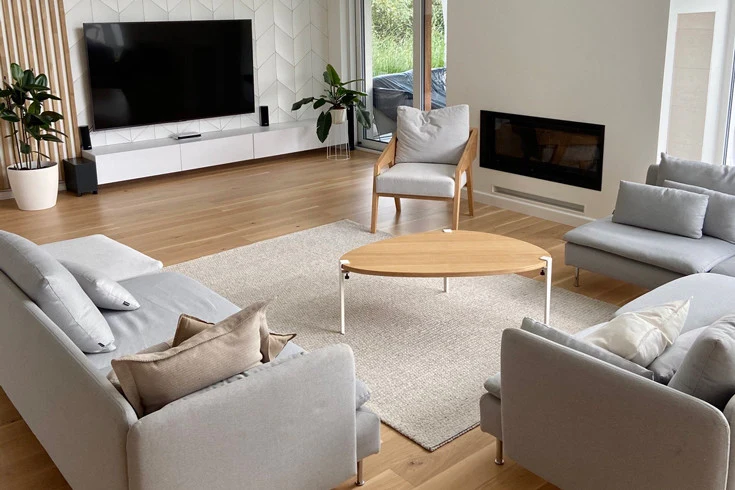
A sofa can be the perfect size for a room and still sit in the wrong place for the television. If the picture feels too small, too intense, or awkward from the side seat, the answer may be a furniture adjustment rather than a new screen.
A useful sofa distance from TV depends on screen size, viewing angle, and what you watch. About 30 degrees of screen coverage suits many mixed-use setups; a wider angle around 40 degrees feels more like a theater.
Start with the actual seat and test the whole room before moving the sofa or buying a larger television.
Start With the Seat, Not the Screen
A large television can look perfectly balanced on a showroom wall and oddly overpowering in a modest living room. The missing measurement is the distance from the viewer’s eyes to the screen, not the length of the room or the space between two walls.
Sofa distance from TV should be chosen around how the room is used. A family watching news while chatting may like a gentler view than someone who wants films to fill much of their vision. Neither preference makes the other arrangement wrong.
Sit where you normally watch and have someone measure from your eye position to the planned screen plane. If you measure from the sofa back instead, you can accidentally add a foot or more and choose a larger screen than you intended.
Why Two Good Viewing Guides Give Different Numbers
Viewing distance is often described by the angle the screen occupies in your field of vision. A wider angle feels more immersive, while a narrower one makes it easier to notice people and activity elsewhere in the room.
RTINGS’ TV size and distance guide uses roughly 30 degrees for mixed viewing and 40 degrees for a more cinematic experience. Those are starting points, not rules for every person, room, or type of content.
Samsung’s size guide offers a closer viewing-distance recommendation for a more immersive setup. If two charts disagree, ask which viewing experience each assumes before deciding that one is wrong.
A Worked Example With a 65-Inch Screen
Suppose the sofa puts your eyes about eight feet from a 65-inch TV. That falls near the relaxed, mixed-use end of common guidance. A film may feel less enveloping than it would from a closer chair, but subtitles and conversation can still work comfortably.
Move the same sofa roughly a foot and a half closer, and the picture becomes more dominant. That can feel exciting for movies yet leave less room for a coffee table or a route behind the seating.
Before moving heavy furniture, mark the proposed sofa front with painter’s tape. Sit in a dining chair at the new eye position for ten minutes. The test costs nothing and often reveals a tradeoff that a chart cannot show.
When a Smaller Screen Makes the Room Better
In a narrow apartment, the TV wall may be close to the sofa by necessity. A large screen can crowd the visual field and make a quiet evening feel like sitting in the first row of a theater.
A smaller screen can leave room for artwork, shelves, and a lower media cabinet without swallowing the whole wall. If the room doubles as a place to read or entertain guests, that balance may matter more than cinematic scale.
Do not judge size from a product photo. Cut a paper rectangle or tape the dimensions on the wall, then step back to the actual seat. The screen’s diagonal is not the same as its width, so use the manufacturer’s physical dimensions.
The Coffee Table Can Change the Entire Layout
An ideal viewing distance on paper is useless if everyone has to squeeze sideways between the sofa and the table. The TV belongs to a living room, not a dedicated screening booth, and people still need to set down drinks and cross the space.
Move the sofa only after checking knee room and the main walking route. A narrow oval or nesting table may free enough floor space to bring the seats forward without making the room feel packed.
Keep the Screen at a Comfortable Seated Height
A TV mounted high over a fireplace can make a sensible viewing distance feel tiring because viewers must tip their heads upward. The problem is angle, not screen size alone.
Sit naturally and note where your eyes fall on the wall. A low cabinet often places the screen closer to a comfortable line of sight than a tall mantel. If you must mount high, a professionally installed tilting bracket can help with reflections but does not erase every neck-angle concern.
Check the wall material and mount rating before installation. Do not attach a heavy screen to drywall alone unless the hardware is specifically designed and rated for that application. Route cords so they do not dangle across a walkway or invite a child to pull them.
How a Sectional Changes the Best Viewing Spot
An L-shaped sectional gives the room more seating, but not every cushion faces the screen equally. The chaise seat may be much closer, while the far corner views the TV at an angle.
Choose the main watching seat and use that position for your distance measurement. Then sit in the other places before finalizing the mount. A swivel bracket may improve side views, provided it is compatible with the screen and properly installed.
Do not sacrifice the entire conversation area to perfect one seat. A side chair angled toward both the sofa and screen can make the room work for visitors while leaving a good view for everyday watching.
Daylight and Glare Can Undo a Good Measurement
Eight feet from a screen may feel wonderful at night and frustrating at four in the afternoon when a bright window reflects across dark scenes. Moving the sofa closer does not solve the reflection itself.
Check the screen from the main seat at different times of day. Adjustable shades, curtain lining, and a slight change in screen angle can preserve daylight without making the room permanently dim.
Our article on living room TV glare covers that separate problem in more detail. Solve reflections before deciding the television is too small or the sofa is too far away.
Resolution and Text Size Matter for Real Viewing
Modern 4K screens can hold fine detail at relatively close distances, but that does not mean everyone enjoys sitting close. Fast action, bright scenes, and long viewing sessions affect comfort differently from a still picture in a store.
If you play games, look at the smallest interface text from the sofa. If you watch sports, check whether players remain easy to follow. For subtitles, test a normal streaming show rather than a specially prepared demo video.
Eyesight and personal comfort vary. A family member who wears glasses may prefer a different position from someone else. The goal is a room where people can watch without leaning forward, squinting, or twisting their necks.
Plan the Walkway Before Moving the Sofa
Measure the path from the doorway to the next room. A sofa that sits at the perfect viewing distance but blocks the route will make every trip across the room annoying.
Think about a child carrying toys, an adult balancing a laundry basket, or a guest walking past a side table. Leave enough clear floor for normal movement and avoid sharp corners in the main path.
An open walkway often improves the room more than another inch of screen size. If the space is tight, try moving the sofa slightly sideways or using a smaller table rather than pushing furniture against every wall.
A Simple Way to Test Two Layouts in One Evening
Choose two plausible sofa positions and mark both with tape. In the first, keep the room open for conversation. In the second, move closer for a more immersive view. Test the same program from both positions.
Notice what changes besides the picture: the route to the kitchen, access to a lamp, the reach to the coffee table, and whether the side chair still belongs to the group. Write down the tradeoffs before shifting furniture again.
If both positions work, choose the one that supports the room’s most common use. A living room that hosts friends three nights a week deserves a different balance from one mainly used for family movie nights.
When the Screen Should Not Be the Main Focal Point
A fireplace, large window, or favorite piece of art can give the room character. The TV does not need to sit at the exact center of the longest wall if doing so leaves the rest of the furniture awkward.
Try placing the television on a secondary wall with a modest swivel mount, or arrange seating so it faces both the screen and the conversation area. Make sure the chosen wall supports the installation and the cables can be managed safely.
The most comfortable sofa distance from TV is the one that works alongside the room’s other jobs. When guests arrive and the screen turns off, the space should still feel like somewhere people want to stay.
Final Thoughts
A television is only one part of a living room. The best arrangement lets someone enjoy a movie without forcing everyone else to walk around a wall of furniture.
Measure from the eyes, tape the screen outline, and test the everyday routes. The payoff is not a perfect number on a chart; it is a room that works both when the screen is on and when it is dark.
